No more endless to-do lists. Every task gets a day, a time, and a reminder.
How it works
Plan your day
Set your wake-up time, work hours, gym, and wind-down. Every task gets a specific time and day — your schedule fills in automatically.
Create tasks
Add tasks in seconds with a name, time, and duration. TimeGrid sends you a push notification when it's time to start.


Lock in
Start a built-in focus timer when your task begins. Track exactly how long each task takes and stay locked in until it's done.
 Coding
Everything you need to plan, focus, and review your day
Scheduled tasks
Every task gets a time and day. Your daily schedule fills in like a calendar so you always know what’s next.
Focus timers
Start a timer when it’s time to work. Track how long each session takes and build a record of your deep work.
Hour-by-hour dashboard
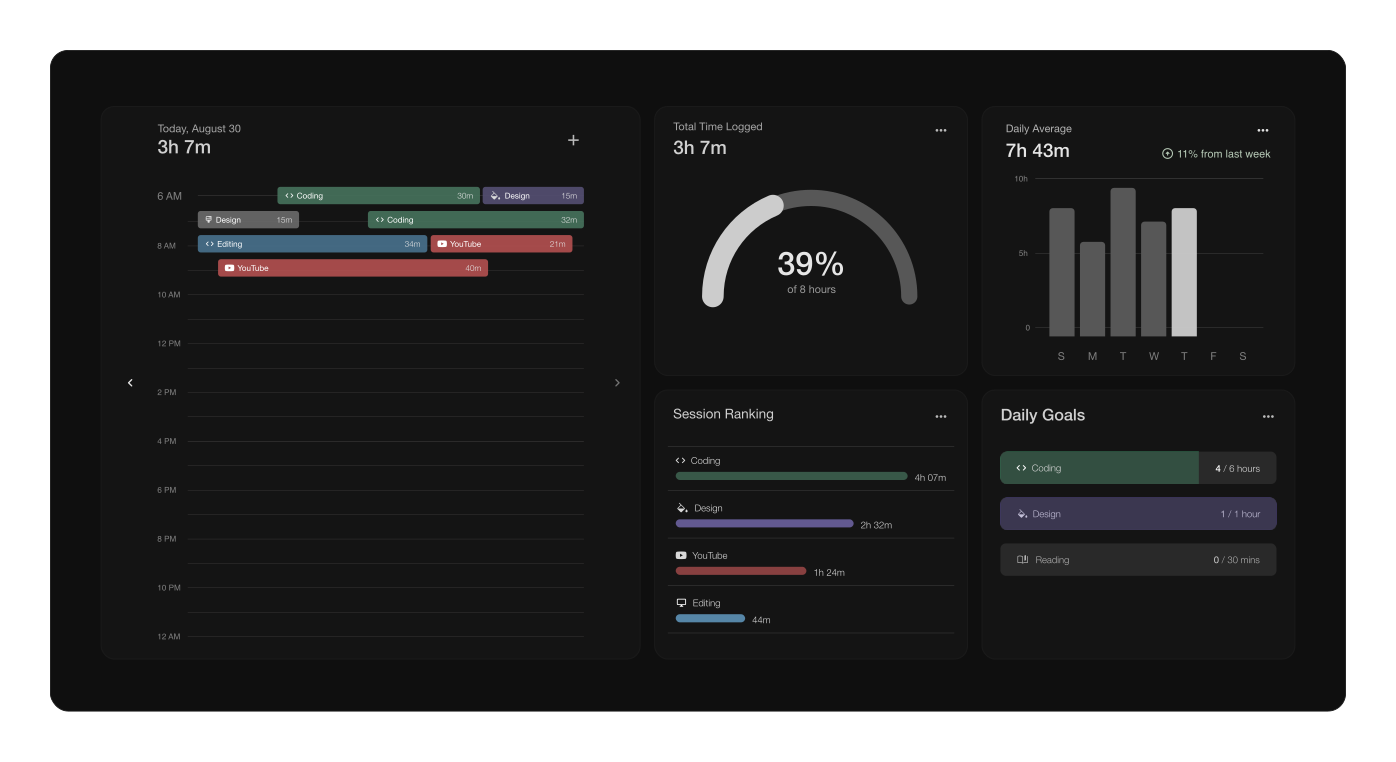
A screen-time-style view of your entire day — what you worked on, for how long, and where your time actually went.
Daily goals
Set a target for hours of focused work, distribute your tasks within that window, and track progress in real time.
Habit tracking
Track recurring daily habits alongside your tasks so everything lives in one place.
Push notifications
Get notified when it’s time to start a task. No more forgetting what you planned to do at 2pm.
Frequently asked questions
What is TimeGrid?
TimeGrid is a daily planner and focus timer for professionals. It combines task scheduling, built-in focus timers, and an hour-by-hour dashboard that shows exactly where your time goes — like screen time, but for your productivity.
How is TimeGrid different from Toggl or Clockify?
Toggl and Clockify are built for billing clients and invoicing companies. TimeGrid is built for individuals who want to optimize their own time. It combines a daily planner, focus timers, and a visual dashboard in one app — no invoicing, no team management.
Is TimeGrid free?
TimeGrid is currently in Alpha and completely free to use. When the app moves to Beta, a paid plan will be introduced, but Alpha users will be the first to know about any changes.
Who is TimeGrid for?
TimeGrid is designed for busy professionals, freelancers, entrepreneurs, and remote workers who want to see exactly how they spend their day and get more focused work done.
Does TimeGrid have a mobile app?
An iPhone app is currently in development and will be the primary way to use TimeGrid. The web app is available now during Alpha testing.
How does the hour-by-hour dashboard work?
After you complete focus sessions throughout the day, the dashboard fills in with a visual breakdown of every hour — what you worked on, for how long, and whether you hit your daily goal. Think of it like screen time reporting, but for your work.